


Private Drafts vs. Final Submissions: Why Employees Hide Their Bills Until Month-End
The top reasons your team is keeping their drafts private until the very last minute.
Executive Summary: The "Shoebox" Syndrome
In every Indian mid-market business (₹50 Cr – ₹1500 Cr), the last week of the month triggers a familiar panic in the Finance department: The snowslide of Expense Claims.
Why do employees wait until the 28th of the month to submit 30 days' worth of travel, fuel, and petty cash bills?
It is not just procrastination. It is anxiety.
In traditional manual workflows (or even basic digital forms), submitting an expense is a "Final Act." Once a sales rep hands over a physical bill or hits "Submit" on a basic web form, it goes straight to their manager or the unforgiving eyes of the Accounts team. If the bill is blurry, or if they lost one receipt from a 3-day trip, they look unorganized. They fear rejection.
So, they behave like hoarders. They keep their physical bills in a shoebox, or their digital photos in a WhatsApp folder, waiting until the "perfect moment" to organize and submit them all at once. This creates massive data entry lag, delays month-end closing, and obscures the company's real-time cash position.
This blog post explores the psychology of expense reporting. We analyze why software user adoption strategies fail when they don't provide a "safe space" for employees to fail, and how Effortless solves this by introducing the "My Bill Box"—a private digital staging area that dramatically improves the speed, accuracy, and compliance of your expense management cycle.
1. The Psychology of the Draft
Think about how you write an important email. Do you type it directly into the "To: CEO" window and hit send immediately? No. You write a draft. You review it. You add an attachment. Only when you are satisfied do you submit it.
Employees treat their reimbursements the same way. An expense claim is a request for their own money. It is personal.
The Flaw of "Submit Only" Systems:
Many generic ERPs and basic expense apps operate on a "Capture $\rightarrow$ Submit" linear flow.
Action: Employee snaps a photo of a lunch bill.
Result: It immediately enters the manager's approval queue.
The Problem:
What if the employee had three different lunch bills on that trip and wants to group them? What if the GST invoice scanner misread a faded receipt and the employee wants to correct it before the boss sees it?
Because they have no "draft" space, they simply don't use the app until the very end of the month when they can sit down and do it all at once.
This behavior fundamentally breaks Cash flow management software for MSMEs India, because the CFO has no visibility into incurred expenses until the month is over.
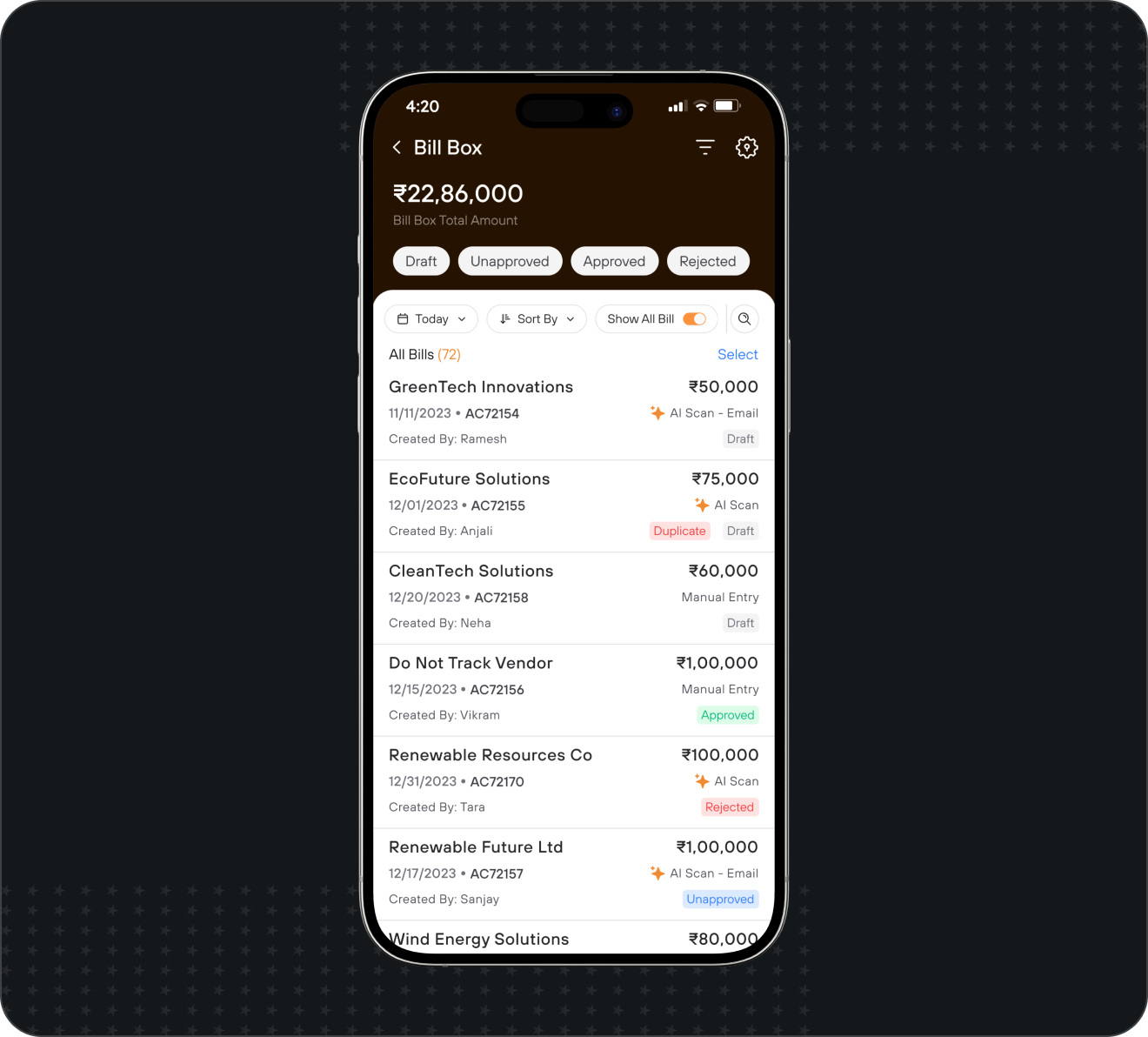
2. The Solution: "My Bill Box" (The Private Workspace)
To fix the month-end avalanche, you must change the user experience. You must separate "Capture" from "Submission."
At Effortless, we engineered a feature called "My Bill Box."
How it Works:
Capture on the Go: A field sales rep buys fuel. They immediately open the mobile bill booking app and snap a photo.
Private Storage: The image and the extracted data (via IDP) are saved in their "My Bill Box."
The "Invisibility Cloak": Here is the critical part—no one else can see this. The Manager cannot see it. The CFO cannot see it. It is the employee's private digital shoebox.
Organization: The employee can do this 20 times over a week. They can group bills, delete duplicates, and review the AI-extracted data at their leisure.
The Final Submission: When they are ready, they select the relevant bills from the box, attach them to a specific "Claim" (e.g., "Mumbai Client Visit - April"), and hit Submit.
Only then does the data enter the official expense approval app workflow.
3. How "My Bill Box" Benefits the Employee (Adoption)
If you want high adoption rates, the software must serve the employee first, and the company second.
A. Anxiety Reduction
The employee is no longer worried about making a mistake in front of their boss. They can test the App to scan and auto-enter GST bills. If the photo is bad, they delete it from their Bill Box and take another one. They control the narrative.
B. "Capture" Becomes a Habit, Not a Chore
Because capturing a bill no longer triggers an immediate, formal workflow, it becomes as casual as taking a selfie.
Paid for taxi → Snap photo → Put phone away.
They don't have to fill out project codes or cost centers while sitting in the back of an auto-rickshaw. They just capture the evidence. They can add the accounting details later when they are back at their desk.
C. No More Lost Bills
By encouraging immediate capture into a private space, you eliminate the #1 cause of employee frustration: losing the physical receipt before the month-end submission.
4. How "My Bill Box" Benefits the CFO (Governance)
While the employee gets privacy, the Finance team gets accuracy and speed.
A. The End of the Month-End Crunch
Because capturing bills is now a daily habit (even if submission is weekly), the data entering the system is fresh. The Finance team receives organized, grouped claims rather than a chaotic dump of 500 individual receipts on the 31st.
B. Higher Quality Data (The IDP Advantage)
When an employee reviews their own bills in the Bill Box, they act as the first line of defense.
Our IDP (Intelligent Document Processing) extracts the GSTIN and Amount.
The employee sees it in their private draft. If the AI misread a faded "8" as a "3," the employee corrects it before the finance team ever sees it.
This drastically reduces the rejection rate and the back-and-forth arguments.
C. Real-Time Compliance Guardrails
Even while the bill is in the private draft stage, Effortless runs silent checks.
Is this a duplicate bill?
Does the vendor's GSTIN pass the validation check?
If a sales rep uploads a "Kaccha" bill into their Bill Box, the system flags it privately to them: "Warning: Invalid GSTIN." The rep knows immediately they need to get a better bill, rather than finding out two weeks later from an angry accountant. This is the essence of How to avoid GST penalties through automated billing software.
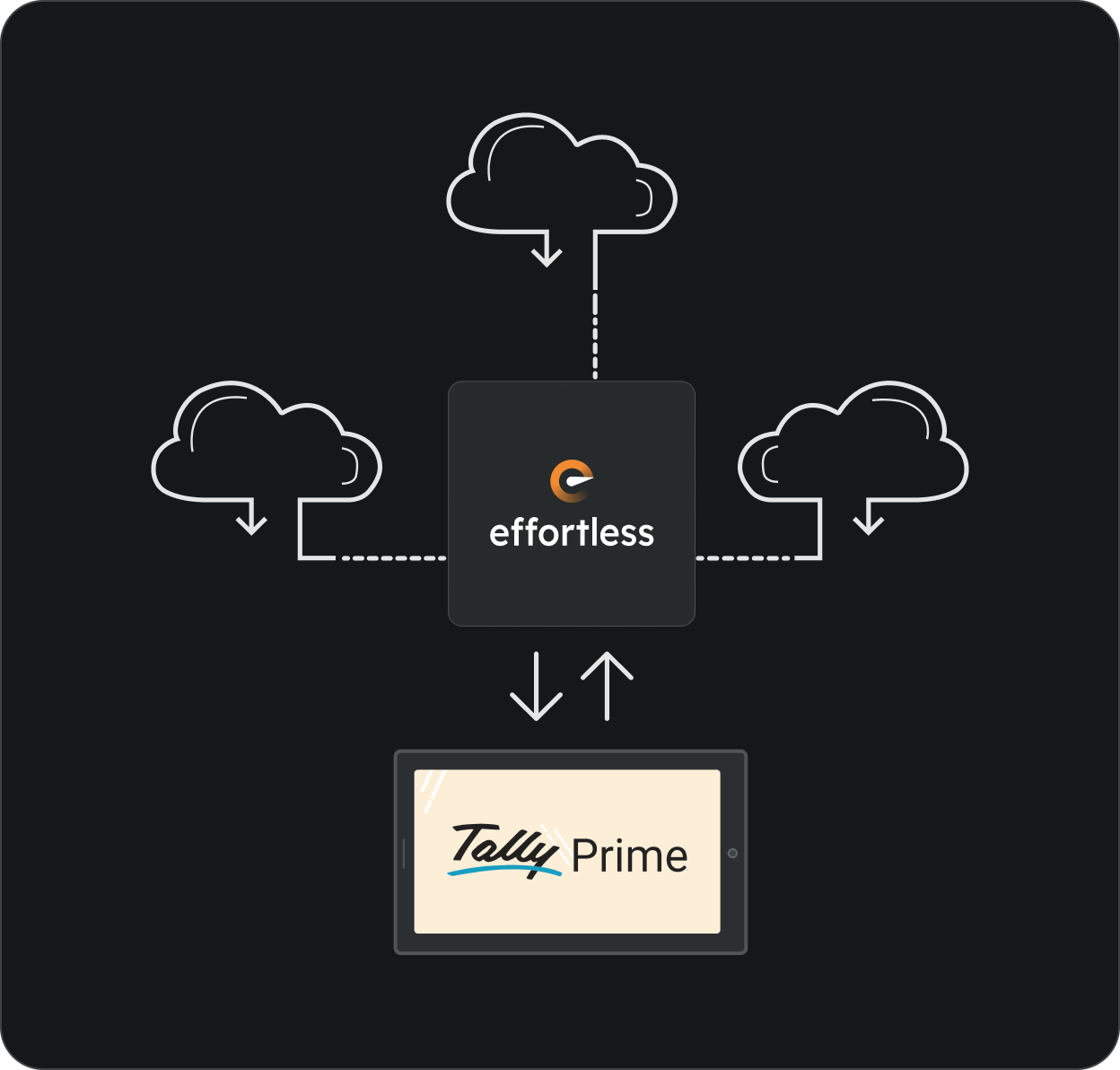
5. Integrating with the "Tally Core"
The ultimate goal of any expense management India solution is to land the data cleanly into the accounting ledger.
Once the employee submits the organized claim from their Bill Box, it enters the multi-level approval software matrix.
Manager approves the business need.
Finance approves the tax compliance.
The Sync: Effortless pushes the finalized Journal Voucher directly into Tally Prime.
Because the data was captured accurately (IDP), organized logically (Bill Box), and verified systematically (GST Checks), your senior accountant spends zero minutes typing and 100% of their time acting as a financial controller.
6. Conclusion: Respecting the User Drives the ROI
Software that treats employees like data-entry robots will always face resistance.
When you acknowledge the human element of expense reporting—the anxiety of making mistakes, the hassle of organizing paper, the fear of rejection—you design better systems.
The "My Bill Box" feature in Effortless is not just a storage folder; it is a psychological buffer. It gives your team the safety to digitize their expenses daily, which in turn gives your CFO the clean, accurate, and compliant data they need to close the books on time.
Stop forcing your team to hoard their expenses. Give them a private workspace, and watch your accounting speed double.
Key Takeaways & FAQ
Q1: Can admins see what is inside an employee's "My Bill Box"?
A: No. That is the core design principle. Bills in the private box are invisible to managers and admins until the employee explicitly attaches them to a claim and clicks "Submit." This guarantees the "safe space" required for high user adoption.
Q2: Does the IDP (AI scanner) work while the bill is in the draft stage?
A: Yes. The moment a photo is uploaded to the Bill Box, the GST invoice scanner extracts the data (Amount, Date, GSTIN). This allows the employee to verify the AI's reading privately before submitting it to finance.
Q3: How does this help with multi-branch setups?
A: In a multi-branch GSTN billing solution, an employee might travel across states. In their Bill Box, they can easily tag different receipts to different branches or cost centers before submitting the final consolidated claim, ensuring accurate Tally mapping later.
Q4: Can employees upload digital PDFs directly, or only photos?
A: Both. Employees can snap photos of physical receipts or forward PDF invoices (like flight tickets or Uber receipts) directly into their Effortless Bill Box via email or file upload.
Q5: What happens to the physical receipts once uploaded?
A: Once uploaded and processed by Effortless, the digital copy becomes the "Single Source of Truth," carrying a complete audit trail. For most standard expenses, the physical paper can be discarded, adhering to modern digital compliance standards.
Suggested Reading from the Effortless Edge Blog
Stop the Leakage: 5 Ways Manual Expense Claims Are Costing You 4% of Revenue – Why the paper-based system is bleeding your margins.
Reading vs. Understanding: The Real Difference Between OCR and IDP – How our AI extracts data accurately from messy receipts.
The "Maker-Checker" Shield: Protecting Your Tally Data from Unauthorized Edits – What happens after the employee hits submit.
Don’t Fire Your Munim-ji: Balancing Modern Tech with Traditional Accounting Wisdom– How automated expenses empower your senior accountants.
Is your finance team dreading the 31st of the month?
[Try the Employee Expense App] and see how "My Bill Box" changes behavior instantly.
Growth Doesn't Wait. Why Should You?
Let Effortless help you scale—without the scramble.
Talk to Us
Have questions about how Effortless can transform your business? Our team of experts is ready to help.
- Schedule a personalized demo
- Get your specific questions answered
- Discuss your unique business challenges
We'll reach out within 4 business hours
Request Demo
See Effortless in action with a personalized demo tailored to your business.
- No generic presentations
- Focus on your specific challenges
- Get a clear picture of your potential ROI
Choose a time that works for you
Your Growth Engine Starts Here
More growth, less overhead. Discover how India's fastest growing businesses do it.
- Automate invoicing, collections & approvals
- Track sales team performance
- Get cashflow clarity in real-time
Clarity in 30 minutes. No pressure, just proof.